python实战练手项目—使用turtle模块画奥运五环
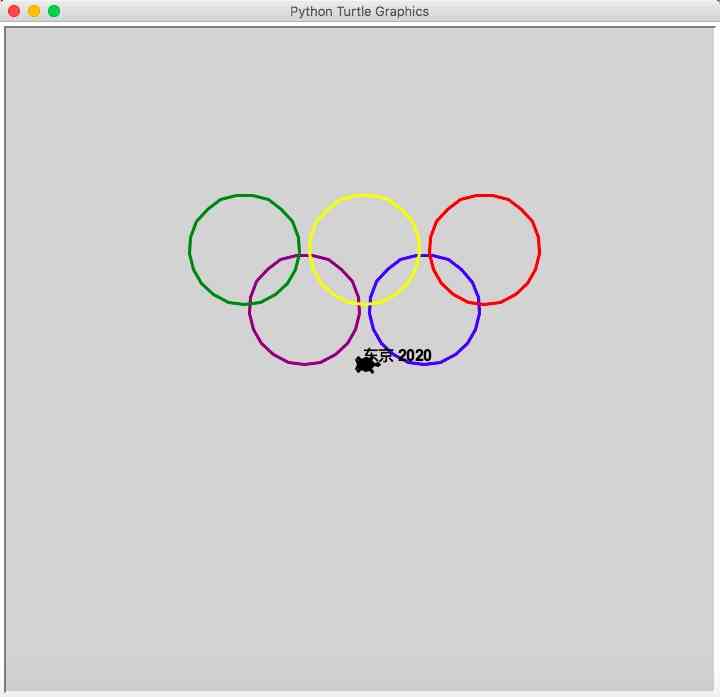
2020年将举办东京奥运会,本篇实践文章将带你使用turtle模块画一个五环图,先来看效果图

1. 定义一个类继承Turtle
class OlympicTurtle(turtle.Turtle):
def __init__(self):
turtle.Turtle.__init__(self, shape="turtle")
screen = turtle.Screen()
screen.bgcolor("lightgrey")
self.pensize(3)
self.speed(3)
|
在初始化函数中,我设置了画图区域的背景颜色,设置了画笔的大小以及绘画的速度。
2. 画圆
画一个圆使用circle方法,并提供半径大小,此外还需要指定坐标和颜色,在Turtle中,画布的中央位置是原点(0, 0), 回想一下高中时代学过的直角坐标系和四个象限等概念。
def draw_circle(self, x, y, color, radius=55):
self.penup()
self.setposition(x, y)
self.pendown()
self.color(color)
self.circle(radius)
|
一旦给定了坐标,就可以使用self.setposition方法将画笔定位到该坐标的位置上,penup是抬起画笔,pendown是让画笔落下,color方法设置颜色
3. 五环
def draw_olympic_symbol(self):
    """
    (0, 0) 在画布的中央位置
    :return:
    """
    circle_lst = [(60, 0, "blue"), (-60, 0, "purple"), (120, 60, "red"),
                 (0, 60, "yellow"), (-120, 60, "green")]

    for x, y, color in circle_lst:
        self.draw_circle(x, y, color)

    self.drawText()
|
在circle_lst中定义5个圆圈的坐标和颜色,遍历这个列表,调用draw_circle方法绘图,最后调用drawText方法书写文字
4. 全部代码
import turtle
class OlympicTurtle(turtle.Turtle):
def __init__(self):
turtle.Turtle.__init__(self, shape="turtle")
screen = turtle.Screen()
screen.bgcolor("lightgrey")
self.pensize(3)
self.speed(3)
def draw_circle(self, x, y, color, radius=55):
self.penup()
self.setposition(x, y)
self.pendown()
self.color(color)
self.circle(radius)
def draw_olympic_symbol(self):
"""
(0, 0) 在画布的中央位置
:return:
"""
circle_lst = [(60, 0, "blue"), (-60, 0, "purple"), (120, 60, "red"),
(0, 60, "yellow"), (-120, 60, "green")]
for x, y, color in circle_lst:
self.draw_circle(x, y, color)
self.drawText()
def drawText(self):
self.penup()
self.setposition(0, 0)
self.setheading(0)
self.pendown()
self.color("black")
self.write("东京 2020", font=("Arial", 16, "bold"))
if __name__ == "__main__":
t = OlympicTurtle()
t.draw_olympic_symbol()
turtle.getscreen()._root.mainloop()
|